
安装参考【文档】
1. 创建索引
创建一个名为 products 的索引:
# 创建索引,URL 没有特殊字符(如 ?, &, = 等),引号是可选的
# 这三种形式都可以,-X -PUT可以连写也可以分开
curl -XPUT "http://localhost:9200/products"
curl -XPUT http://localhost:9200/products
curl -X PUT http://localhost:9200/products

# 查看索引
# XGET的时候可以省略,URL无特殊字符引号也可以省略
curl -XGET "http://localhost:9200/products"
curl -XGET http://localhost:9200/products
curl -X GET http://localhost:9200/products
curl http://localhost:9200/products

# 查看所有索引
curl -XGET http://localhost:9200/_cat/indices?v

# 查询所有节点
curl -XGET http://localhost:9200/_cat/nodes?v

# 查询索引的分片信息
curl -XGET http://localhost:9200/_cat/shards?v

# 查看所有别名
curl -XGET http://localhost:9200/_cat/aliases?v
2. 创建类型
curl -H 'Content-Type: application/json' -XPUT http://localhost:9200/products/_mapping?pretty -d'{
    "properties": {
        "title": { "type": "text", "analyzer": "ik_smart" },
        "description": { "type": "text", "analyzer": "ik_smart" },
        "price": { "type": "scaled_float", "scaling_factor": 100 }
    }
}'
解析:
- 提交数据中的 properties 代表这个索引中各个字段的定义,其中 key 为字段名称,value 是字段的类型定义;
- type 定义了字段的数据类型,常用的有 text / integer / date / boolean,还有许多类型。
- analyzer 是一个新的概念,这是告诉 Elasticsearch 应该用什么方式去给这个字段做分词,这里我们用了 ik_smart,是一个中文分词器。
3. 创建文档
往索引里面插入一些文档:
curl -H 'Content-Type: application/json' -XPUT http://localhost:9200/products/_doc/1?pretty -d'{
    "title": "iPhone X",
    "description": "新品到货",
    "price": 8848
}'

curl -H 'Content-Type: application/json' -XPUT http://localhost:9200/products/_doc/2?pretty -d'{
    "title": "OPPO R15",
    "description": "新品到货",
    "price": 2000
}'
4. 查询文档
用 ID 来获取指定的文档:?pretty表示输出美化
curl http://localhost:9200/products/_doc/1?pretty5. 简单搜索
curl -XPOST -H'Content-Type:application/json' http://localhost:9200/product/_search?pretty -d'
{
  "query" : { "match" : { "description" : "新品" }}
}'
6. 查询入门
1. 布尔与词项查询
布尔查询与 SQL 语言中的 and / or 有些类似,可以根据多个条件来筛选文档。
布尔查询下可以有 filter / must / should / must_not 4 类条件,每个类条件对应的项都是一个数组,数组内每个项对应一个条件。
其中 filter 和 must 与 SQL 中的 and 类似,查询的文档必须符合这两类下的条件,只不过 must 下的条件会参与 打分 而 filter 下的条件不会;must_not 和 must 相反,查询的文档必须不符合此类下的条件;should 下的条件不需要全部满足,默认情况下只需要满足 should 下的一个条件即可,也可以通过 minimum_should_match 参数来改变需要满足的个数,满足的 should 条件越多,对应的文档的打分就越高,打分高的文档排序会靠前。
$params = [
    'index' => 'products',
    'body'  => [
        'query' => [
            'bool' => [
                'filter' => [
                    ['term' => ['on_sale' => true]],
                ],
            ],
        ],
    ],
];
在 Elasticsearch 的查询中,每一个条件都是一个 Key-Value 数组,并且这个数组只会有一个 Key,这个 Key 代表了这个条件的查询方式。
在上面的例子中我们只有一个条件:['term' => ['on_sale' => true]],这个数组的 Key 是 term 代表这是一个『词项查询』。
『词项查询』通常用于搜索一个精确的值, Elasticsearch 会拿搜索值在文档对应字段经过分词的结果里精确匹配。我们之前在定义索引数据结构时,on_sale 是一个 Bool 类型,其分词结果就是本身,所以上面这个条件就是查出所有 on_sale 字段是 true 的文档。
2. 分页查询
分页是数据库查询的一项必要功能,接下来我们就要学习一下 Elasticsearch 的分页。 Elasticsearch 提供了 from 和 size 两个参数,含义与 SQL 语句的 limit $offset, $count 语法中的 $offset 与 $count 参数完全一致。
>>> $params = [
    'index' => 'products',
    'body'  => [
        'from'  => 0,
        'size'  => 5,
        'query' => [
            'bool' => [
                'filter' => [
                    ['term' => ['on_sale' => true]],
                ],
            ],
        ],
    ],
];
>>> $results = app('es')->search($params);
>>> count($results['hits']['hits']);
>>> $results['hits']['total']['value']
在返回数据中的 $results['hits']['hits'] 数组包含了此次查询符合条件的文档,用 count() 可以获得其数量,和分页的size数量一致,而 $results['hits']['total']['value'] 则代表整个索引中符合查询条件的文档数量。
3. 排序
Elasticsearch 的排序很简单,只需要一个 sort 参数,sort 参数是一个数组,数组下的项可以有多种格式,我们常用的格式是 Key-Value 数组,Key 是要排序的字段,Value 可以是 desc 或者 asc。
>>> $params = [
    'index' => 'products',
    'body'  => [
        'from'  => 0,
        'size'  => 5,
        'query' => [
            'bool' => [
                'filter' => [
                    ['term' => ['on_sale' => true]],
                ],
            ],
        ],
        'sort' => [
            ['price' => 'desc']
        ],
    ],
];
>>> $results = app('es')->search($params);
>>> collect($results['hits']['hits'])->pluck('_source.price');
由于返回结果的结构比较长,我们不太容易用肉眼去找,因此我们通过 collect() 函数将返回结果转换成集合,然后通过集合的 pluck 方法取出 price 字段的值
4. 多字段匹配查询
Elasticsearch 中的多字段匹配(Multi Match)查询,多字段匹配查询允许我们用一个关键词在多个不同的字段进行匹配,并且可以指定不同字段的匹配权重,权重高的字段有对应的匹配则得分高,最终搜索结果将按照得分降序排列。多字段匹配查询很适合作为电商系统的搜索查询。
>>> $params = [
    'index' => 'products',
    'body'  => [
        'query' => [
            'bool' => [
                'filter' => [
                    ['term' => ['on_sale' => true]],
                ],
                'must' => [
                    [
                        'multi_match' => [
                            'query'  => 'iPhone',
                            'fields' => [
                                'title^3',
                                'long_title^2',
                                'description',
                            ],
                        ],
                    ],
                ],
            ],
        ],
    ],
];
>>> app('es')->search($params);
5. 多字段匹配查询支持 Nested 对象
Elasticsearch 的多字段匹配查询是不支持查询 Nested 对象的字段,例如下面这个查询:
>>> $params = [
    'index' => 'products',
    'body'  => [
        'query' => [
            'bool' => [
                'filter' => [
                    ['term' => ['on_sale' => true]],
                ],
                'must' => [
                    [
                        'multi_match' => [
                            'query'  => '256G',
                            'fields' => [
                                'skus.title',
                                'skus.description',
                                'properties.value',
                            ],
                        ],
                    ],
                ],
            ],
        ],
    ],
];
>>> app('es')->search($params);
查询出来的结果是空,但我们又需要支持 SKU 和商品属性的查询,这就需要在定义索引时使用的 copy_to 参数:
curl -H'Content-Type: application/json' -XPUT http://localhost:9200/products/_mapping?pretty -d'{
    "properties": {
        "type": { "type": "keyword" } ,
        "title": { "type": "text", "analyzer": "ik_smart" },
        "long_title": { "type": "text", "analyzer": "ik_smart" },
        "category_id": { "type": "integer" },
        "category": { "type": "keyword" },
        "category_path": { "type": "keyword" },
        "description": { "type": "text", "analyzer": "ik_smart" },
        "price": { "type": "scaled_float", "scaling_factor": 100 },
        "on_sale": { "type": "boolean" },
        "rating": { "type": "float" },
        "sold_count": { "type": "integer" },
        "review_count": { "type": "integer" },
        "skus": {
            "type": "nested",
            "properties": {
                "title": { "type": "text", "analyzer": "ik_smart", "copy_to": "skus_title" },
                "description": { "type": "text", "analyzer": "ik_smart", "copy_to": "skus_description" },
                "price": { "type": "scaled_float", "scaling_factor": 100 }
            }
        },
        "properties": {
            "type": "nested",
            "properties": {
                "name": { "type": "keyword" },
                "value": { "type": "keyword", "copy_to": "properties_value" }
            }
        }
    }
}'
注意看 skus.title 字段的定义里加入了 copy_to 参数,值是 skus_title,Elasticsearch 就会把这个字段值复制到 skus_title 字段里,这样就可以在 multi_match 的 fields 里通过 skus_title 来匹配。skus.description 和 properties.name 同理。
>>> $params = [
    'index' => 'products',
    'body'  => [
        'query' => [
            'bool' => [
                'filter' => [
                    ['term' => ['on_sale' => true]],
                ],
                'must' => [
                    [
                        'multi_match' => [
                            'query'  => '256G',
                            'fields' => [
                                'skus_title',
                                'skus_description',
                                'properties_value',
                            ],
                        ],
                    ],
                ],
            ],
        ],
    ],
];
>>> app('es')->search($params);
注意 multi_match 的 fields 我们已经改成了 copy_to 的字段,可以看到已经查出了对应的商品。
6. 索引结构迁移
在 Elasticsearch 相关的业务功能开发的过程中如果有涉及到商品索引的变更,我们都是通过手动调用 Elasticsearch 的接口完成的,这就如同 MySQL 的数据库结构变更都是由运维或者开发人员在代码上线时通过手动执行 SQL 来完成,这里会有两个问题:
- 在做某些变更时需要先关闭索引,完成变更之后再打开,需要执行很多次命令,操作起来比较麻烦;
- 索引的字段只能添加而不能修改,比如可以给 nested 类型的字段添加新的子字段,而 integer 类型的字段则无法被修改为 string 类型。
- 对于问题一我们可以通过写脚本的来避免手工操作的麻烦,但还是需要每次都编写对应的升级脚本;而问题二就更严重,需要删除掉旧的索引,根据新的结构创建新索引,然后还需要重新添加数据到索引中,可能会有较长的不可用时间。
1. 别名
在 Elasticsearch 中可以给索引指定一个『别名』,对别名的所有操作都会映射到该别名所对应的索引。同时 Elasticsearch 也允许我们修改一个已存在的『别名』,将其指向另外一个索引。
根据这些特性,我们可以将商品索引命名为 products_0,然后创建一个名为 products 的别名并指向 products_0,当我们需要修改商品索引的字段时,先尝试直接在 products_0 上修改,如果修改成功则不做任何操作,否则我们用新的结构创建一个新的索引 products_1,然后将商品数据同步到 products_1 中,同步完成后我们将 products 别名修改为指向 products_1,然后删除掉原有的 products_0 索引。
由于我们在代码中的所有操作都是对 products 这个别名进行的,而我们在变更索引的整个过程中 products 始终指向一个可用的索引,这样就实现了 Elasticsearch 索引结构的无缝迁移。 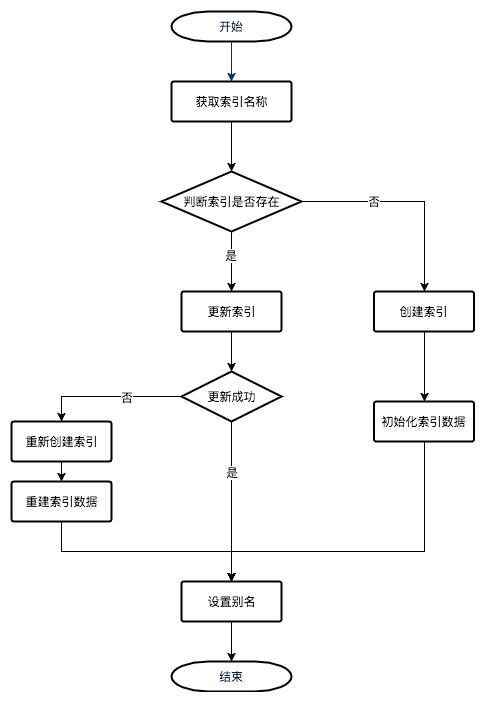
2. 实现流程框架
接下来我们将按照上面的流程图来实现索引迁移功能,先创建一个命令:
php artisan make:command Elasticsearch/Migrate实现流程的大框架和各个步骤的具体操作:
<?php
namespace App\Console\Commands\Elasticsearch;

use Illuminate\Console\Command;

class Migrate extends Command
{
    protected $signature = 'es:migrate';
    protected $description = 'Elasticsearch 索引结构迁移';
    protected $es;

    public function __construct()
    {
        parent::__construct();
    }

    public function handle()
    {
        $this->es = app('es');
        // 索引类数组,先留空
        $indices = [Indices\ProjectIndex::class];
        // 遍历索引类数组
        foreach ($indices as $indexClass) {
            // 调用类数组的 getAliasName() 方法来获取索引别名
            $aliasName = $indexClass::getAliasName();
            $this->info('正在处理索引 '.$aliasName);
            // 通过 exists 方法判断这个别名是否存在
            if (!$this->es->indices()->exists(['index' => $aliasName])) {
                $this->info('索引不存在,准备创建');
                $this->createIndex($aliasName, $indexClass);
                $this->info('创建成功,准备初始化数据');
                $indexClass::rebuild($aliasName);
                $this->info('操作成功');
                continue;
            }
            // 如果索引已经存在,那么尝试更新索引,如果更新失败会抛出异常
            try {
                $this->info('索引存在,准备更新');
                $this->updateIndex($aliasName, $indexClass);
            } catch (\Exception $e) {
                $this->warn('更新失败,准备重建');
                $this->reCreateIndex($aliasName, $indexClass);
            }
            $this->info($aliasName.' 操作成功');
        }
    }

    // 创建新索引
    protected function createIndex($aliasName, $indexClass)
    {
        // 调用 create() 方法创建索引
        $this->es->indices()->create([
            // 第一个版本的索引名后缀为 _0
            'index' => $aliasName.'_0',
            'body'  => [
                // 调用索引类的 getSettings() 方法获取索引设置
                'settings' => $indexClass::getSettings(),
                'mappings' => [
                    // 调用索引类的 getProperties() 方法获取索引字段
                    'properties' => $indexClass::getProperties(),
                ],
                'aliases'  => [
                    // 同时创建别名
                    $aliasName => new \stdClass(),
                ],
            ],
        ]);
    }

    // 更新已有索引
    protected function updateIndex($aliasName, $indexClass)
    {
        // 暂时关闭索引
        $this->es->indices()->close(['index' => $aliasName]);
        // 更新索引设置
        $this->es->indices()->putSettings([
            'index' => $aliasName,
            'body'  => $indexClass::getSettings(),
        ]);
        // 更新索引字段
        $this->es->indices()->putMapping([
            'index' => $aliasName,
            'body'  => [
                'properties' => $indexClass::getProperties(),
            ],
        ]);
        // 重新打开索引
        $this->es->indices()->open(['index' => $aliasName]);
    }

    // 重建索引
    protected function reCreateIndex($aliasName, $indexClass)
    {
        // 获取索引信息,返回结构的 key 为索引名称,value 为别名
        $indexInfo     = $this->es->indices()->getAliases(['index' => $aliasName]);
        // 取出第一个 key 即为索引名称
        $indexName = array_keys($indexInfo)[0];
        // 用正则判断索引名称是否以 _数字 结尾
        if (!preg_match('~_(\d+)$~', $indexName, $m)) {
            $msg = '索引名称不正确:'.$indexName;
            $this->error($msg);
            throw new \Exception($msg);
        }
        // 新的索引名称
        $newIndexName = $aliasName.'_'.($m[1] + 1);
        $this->info('正在创建索引'.$newIndexName);
        $this->es->indices()->create([
            'index' => $newIndexName,
            'body'  => [
                'settings' => $indexClass::getSettings(),
                'mappings' => [
                    'properties' => $indexClass::getProperties(),
                ],
            ],
        ]);
        $this->info('创建成功,准备重建数据');
        $indexClass::rebuild($newIndexName);
        $this->info('重建成功,准备修改别名');
        $this->es->indices()->putAlias(['index' => $newIndexName, 'name' => $aliasName]);
        $this->info('修改成功,准备删除旧索引');
        $this->es->indices()->delete(['index' => $indexName]);
        $this->info('删除成功');
    }
}
3. 创建索引类
接下来我们需要创建商品索引类,以供迁移命令调用:
$ mkdir -p app/Console/Commands/Elasticsearch/Indices/
$ touch app/Console/Commands/Elasticsearch/Indices/ProjectIndex.php<?php
namespace App\Console\Commands\Elasticsearch\Indices;
class ProjectIndex
{
public static function getAliasName()
{
return 'products';
}
public static function getProperties()
{
return [
'type' => ['type' => 'keyword'],
'title' => ['type' => 'text', 'analyzer' => 'ik_smart', 'search_analyzer' => 'ik_smart_synonym'],
'long_title' => ['type' => 'text', 'analyzer' => 'ik_smart', 'search_analyzer' => 'ik_smart_synonym'],
'category_id' => ['type' => 'integer'],
'category' => ['type' => 'keyword'],
'category_path' => ['type' => 'keyword'],
'description' => ['type' => 'text', 'analyzer' => 'ik_smart'],
'price' => ['type' => 'scaled_float', 'scaling_factor' => 100],
'on_sale' => ['type' => 'boolean'],
'rating' => ['type' => 'float'],
'sold_count' => ['type' => 'integer'],
'review_count' => ['type' => 'integer'],
'skus' => [
'type' => 'nested',
'properties' => [
'title' => [
'type' => 'text',
'analyzer' => 'ik_smart',
'search_analyzer' => 'ik_smart_synonym',
'copy_to' => 'skus_title',
],
'description' => [
'type' => 'text',
'analyzer' => 'ik_smart',
'copy_to' => 'skus_description',
],
'price' => ['type' => 'scaled_float', 'scaling_factor' => 100],
],
],
'properties' => [
'type' => 'nested',
'properties' => [
'name' => ['type' => 'keyword'],
'value' => ['type' => 'keyword', 'copy_to' => 'properties_value'],
'search_value' => ['type' => 'keyword'],
],
],
];
}
public static function getSettings()
{
return [
'analysis' => [
'analyzer' => [
'ik_smart_synonym' => [
'type' => 'custom',
'tokenizer' => 'ik_smart',
'filter' => ['synonym_filter'],
],
],
'filter' => [
'synonym_filter' => [
'type' => 'synonym',
'synonyms_path' => 'analysis/synonyms.txt',
],
],
],
];
}
public static function rebuild($indexName)
{
// 通过 Artisan 类的 call 方法可以直接调用命令
// call 方法的第二个参数可以用数组的方式给命令传递参数
Artisan::call('es:sync-products', ['--index' => $indexName]);
}
}app/Console/Commands/Elasticsearch/SyncProducts.php
<?php
namespace App\Console\Commands\Elasticsearch;

use App\Models\Product;
use Illuminate\Console\Command;

class SyncProducts extends Command
{
    protected $signature = 'es:sync-products {--index=products}';

    protected $description = '将商品数据同步到 Elasticsearch';

    public function __construct()
    {
        parent::__construct();
    }

    public function handle()
    {
        // 获取 Elasticsearch 对象
        $es = app('es');

        Product::query()
            // 预加载 SKU 和 商品属性数据,避免 N + 1 问题
            ->with(['skus', 'properties'])
            // 使用 chunkById 避免一次性加载过多数据
            ->chunkById(100, function ($products) use ($es) {
                $this->info(sprintf('正在同步 ID 范围为 %s 至 %s 的商品', $products->first()->id, $products->last()->id));

                // 初始化请求体
                $req = ['body' => []];
                // 遍历商品
                foreach ($products as $product) {
                    // 将商品模型转为 Elasticsearch 所用的数组
                    $data = $product->toESArray();

                    $req['body'][] = [
                        'index' => [
                            //  从参数中读取索引名称
                            '_index' => $this->option('index'),
                            '_id'    => $data['id'],
                        ],
                    ];
                    $req['body'][] = $data;
                }
                try {
                    // 使用 bulk 方法批量创建
                    $es->bulk($req);
                } catch (\Exception $e) {
                    $this->error($e->getMessage());
                }
            });
        $this->info('同步完成');
    }
}